
EPC365
From Lead to Service. Every Department. One Connected Platform.
EPC365 connects the renewable energy project lifecycle, from customer intake and site surveys through engineering, permitting, interconnection, procurement, installation, inspection, activation, funding, and ongoing service. Configurable phases and departmental queues move work forward when defined requirements are met, while operational consoles keep teams connected to the same customer and project information.
Book a Demo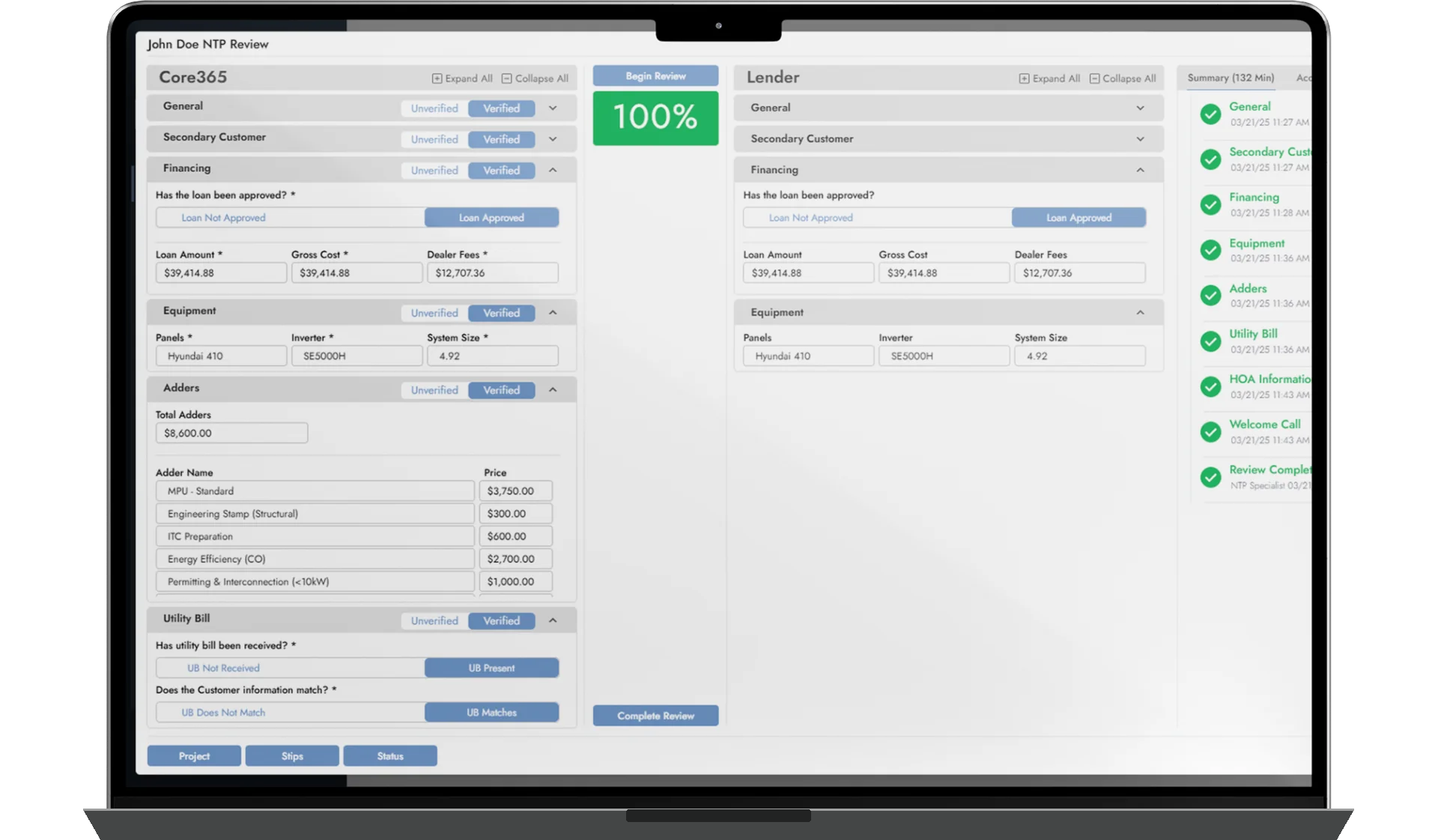
Coordinate renewable energy projects from lead acquisition through installation, activation, funding, and service.
Organize engineering, compliance, installation, procurement, finance, and other departmental work through specialized queues.
Use configurable phases, conditions, notifications, and milestones to move projects between departments.
One Connected Workflow Across the Renewable Energy Lifecycle
Renewable energy projects involve multiple teams, dependencies, approvals, and operational milestones. EPC365 connects those activities through a shared customer and project record.
Departments work within dedicated operational consoles and queues, while configurable project phases define how work progresses. When configured requirements are completed, supported milestone events and conditions can automatically move projects into the next appropriate departmental queue.
This connects sales intake, engineering, compliance, procurement, installation, inspection, activation, financing, and service. EPC365 orchestrates connected Core365 modules rather than replacing their specialized functionality. Approvals, professional review, licensed contractors, utility decisions, and lender authorization remain necessary. Automation follows configured rules and requirements.
Project Phases That Keep Work Moving
Define supported project phases and expected durations around your renewable energy workflow. Phases can be completed by authorized users or supported system events. Configured conditions and milestone events can initiate the next phase, move work between departmental queues, and notify relevant stakeholders.
- Manual and supported event-based phase completion
- Conditional milestone triggers and departmental queue transitions
- Configurable notifications, phase durations, and overdue indicators
Supported settings are tenant-configurable. Not every transition is automatic; some require verification or approval. Advanced customization may require Core365 development.
Built Around Every Department's Responsibilities
Each department monitors relevant work through specialized consoles and queues connected to the same underlying projects. Available queues and settings depend on the tenant and renewable energy workflow.
- Intake and engineering: Customer Experience, NTP, Site Survey, Pre-CAD Review, Design & Engineering, and Post-CAD Review
- Compliance and project management: permitting, interconnection, HOA, incentives, utility PTO, and project management queues
- Procurement and inventory: ready-to-order work, orders, specialty and battery requirements, stock, equipment requests, inventory kits, categories, and warehouses
- Installation: ready, scheduled, pending main panel upgrade (MPU), MPU scheduled, incomplete, and post-install audit work
- Funding and finance: lender funding, stipulations, invoicing, future payments, payment administration, vendor payments, and job costing
- Other operational areas: sales, reporting, Third-Party EPC issue tracking, and configured support workflows
Queues make assigned work, status, and outstanding requirements visible. Inclusion and removal follow configured business rules; an empty queue does not guarantee successful project completion or automatic exception resolution. Payroll-related administration does not establish payment execution.
Start With a Connected Customer and Project Record
Customer intake, NTP, and Site Survey queues help teams manage requirements and coordinate work before engineering. Supported Forms365 workflows collect project information, site conditions, photos, and required documentation against the underlying project.
Configured milestones determine readiness to advance. Site surveys are not universally performed or validated by AI.
Engineering Workflows With Structured Review Stages
The Engineering Console connects pre-CAD review, design and engineering, and post-CAD review. Teams manage design-related requirements and associated documentation before permitting and installation, with supported Forms365 workflows keeping information linked to the project.
EPC365 does not automatically produce every CAD drawing or automate every engineering review.
Early Access
AI-Assisted Engineering Plan Review
AI-assisted engineering plan review is being introduced to help teams identify potential drawing inconsistencies, missing information, and design concerns before final professional review.
- Review electrical diagrams, equipment specifications, and module layouts.
- Identify potential inconsistencies across planset drawings.
- Organize findings for CAD and engineering teams to review.
AI-assisted findings support professional review. They do not replace a licensed engineer or AHJ review, guarantee code compliance, or ensure permitting approval.
Compliance Workflows Connected to Project Execution
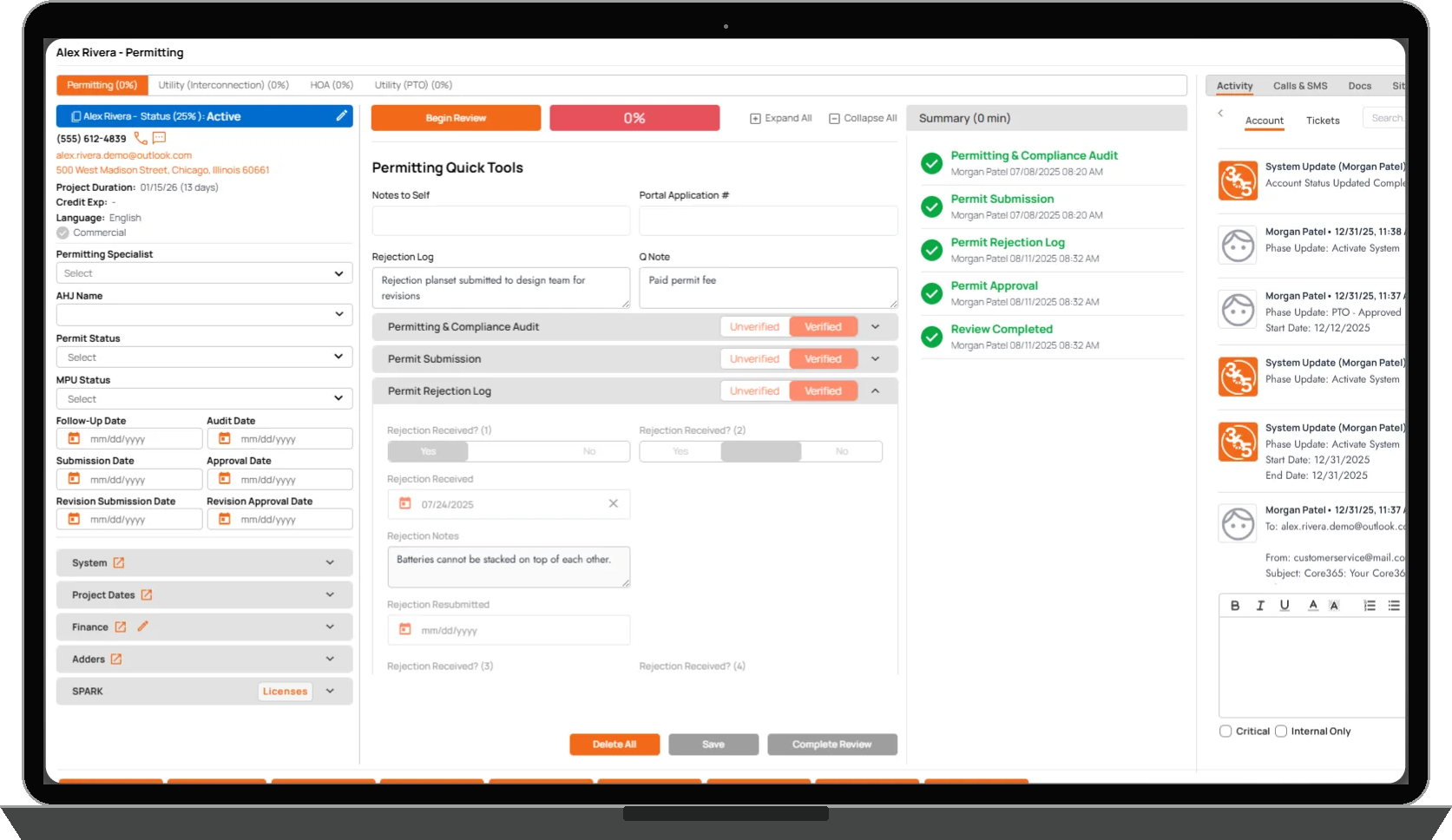
Permitting, utility interconnection, HOA requirements, incentives, and permission-to-operate activities stay connected to the project. Dedicated queues help teams manage submissions, outstanding requirements, revisions, and approval-related tasks, while the Compliance Console provides workload and status visibility.
- Permitting, Utility Interconnection, HOA, Incentives, and Utility PTO queues
- Project-linked documentation and configurable workflow requirements
- SPARK365 customer-maintained authority and utility reference information
Core365 does not guarantee regulatory compliance or control AHJ decisions, utility approvals, incentive eligibility, or PTO authorization. SPARK365 information is maintained by the customer, not an independently verified legal database.
Connect Material Readiness to Project Execution
EPC365 works with Procurement365 to connect material planning, purchasing, inventory, and equipment requests to renewable energy projects. Procurement queues organize ready-to-order work, purchase orders, specialty equipment, battery requirements, stock, and equipment requests.
- Project-linked material requirements and supported cost associations
- Inventory and warehouse visibility across operational locations
- Procurement365 connectivity without replacing its specialized functionality
Equipment availability and automatic purchasing from every supplier are not guaranteed.
From Ready to Install Through Post-Install Review
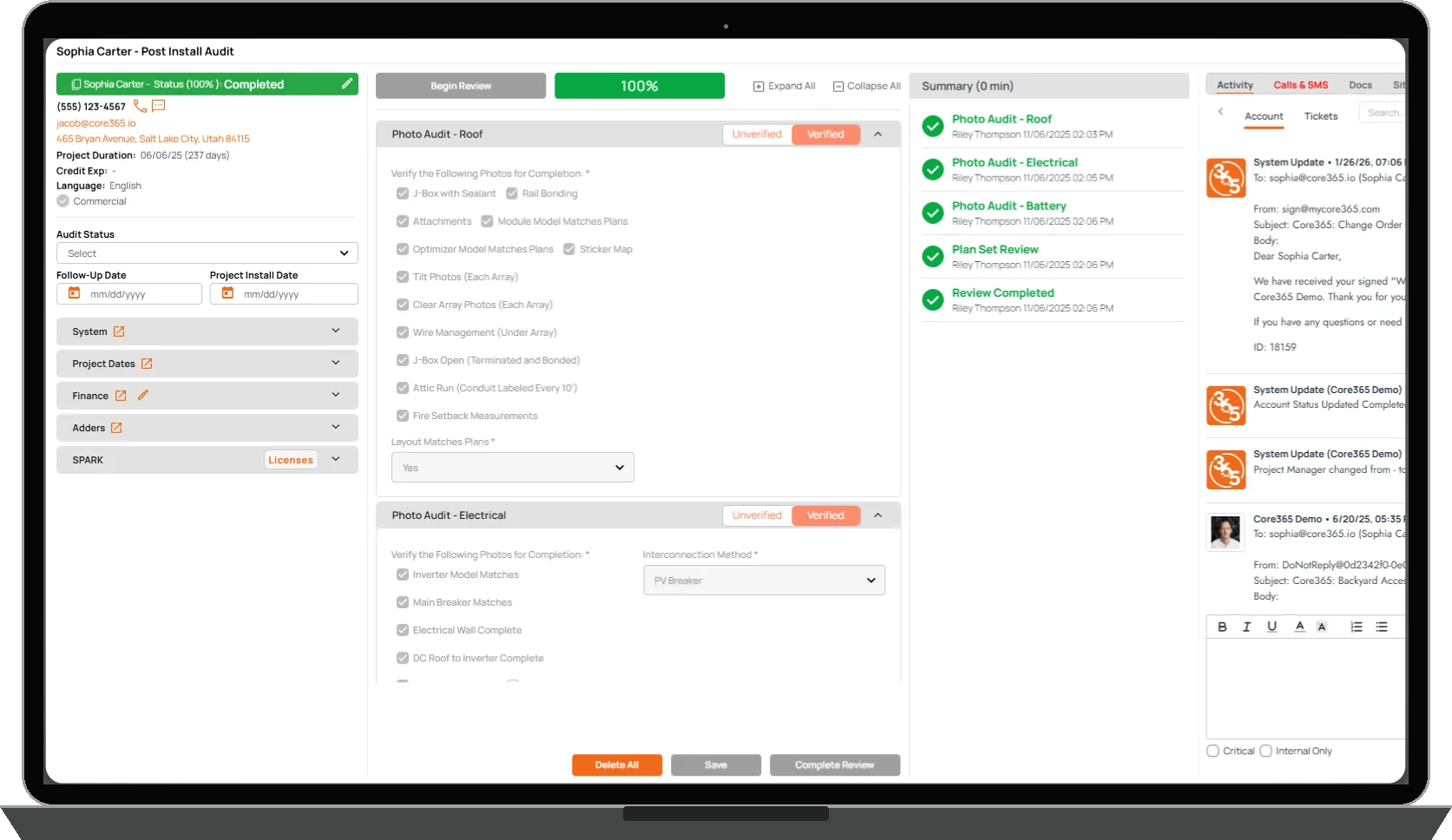
The Installation Console and dedicated queues organize projects that are ready to install, scheduled, completed pending main panel upgrade (MPU), MPU scheduled, incomplete, or awaiting post-install audit. Configurable readiness requirements, assignments, and audit workflows keep the next required actions visible.
- Ready for Install and Scheduled queues
- Completed Pending MPU, MPU Scheduled, and Incomplete Install queues
- Post Install Audit Queue and installation settings
Scheduling does not automatically resolve every crew or site constraint. Installation quality and project completion depend on configured verification and professional work.
Manage the Final Steps Toward Activation
Inspection and utility PTO workflows help teams manage final requirements, approval milestones, operational exceptions, and system activation status. The connected project record keeps these steps visible alongside earlier milestones.
Core365 does not issue PTO or authorize system energization. Those decisions remain with the applicable utility or authority.
Keep Funding and Financial Work Connected to the Project
EPC365 connects project progression to applicable Lender365 and Finance365 workflows. The Funding Console, Lender Funding Queue, and Stipulations Queue help teams monitor lender requirements, while financial workflows connect invoices, payment administration, vendor payments, and job costing to projects.
Lender integrations vary by provider. Core365 does not originate, approve, or fund loans. It is not a traditional general-ledger accounting platform or complete financial ERP, and does not process payroll, execute bank payments, or file taxes.
The Project Lifecycle Doesn't End at Installation
Service365 connects ongoing service tickets, scheduling, technician workflows, field documentation, and follow-up work to the original customer and renewable energy project. Teams retain continuity between delivery and post-installation support.
Core365 does not perform physical service work or provide every customer with a particular service program or warranty.

Customer Connect Portal
Give Customers Direct Access to Their Project
The Core365 Customer Connect Portal gives customers a single place to follow project milestones, review upcoming visits, access documents, view communications, and request service. Customers can review their project timeline, access available agreements and equipment specifications, view text messages and permitted call recordings, submit referrals, and contact their assigned team. When enabled by the tenant, customers can also review and approve engineering plansets. Each organization controls the information and actions available to its customers through tenant configuration and permissions.
Customer Portal Features
- Project Milestones: View project milestones and track progress throughout the project lifecycle.
- Planset Review and Approval: Review and approve engineering plansets when enabled by the tenant.
- Documents and Agreements: View and download available agreements, project documents, and equipment specification sheets.
- Communication History: Review text messages and access recordings of phone calls associated with their project, where available and permitted.
- Customer Referrals: Submit referrals directly through the portal.
- Service Requests: Request service and submit support needs without contacting the office separately.
- Tenant-Controlled Experience: Each company controls which documents, milestones, communications, and customer actions are available through its portal configuration.
One Place for Customers to Stay Connected
Instead of calling the office for updates, requesting copies of documents, or tracking down previous conversations, customers can access the information made available to them directly through Customer Connect. The portal connects the customer experience with the operational information already managed in Core365.
Configured Around Your Operational Process
Authorized tenant administrators can manage supported project phases, durations, departmental workflow settings, assignments, and related configuration. More advanced requirements may involve additional Core365 development; not every tenant has identical workflows or unrestricted no-code customization.
- EPC365 coordinates renewable energy customer and project lifecycles, handoffs, milestones, and queues
- Analytics365 provides departmental and executive KPIs and performance visibility
- Procurement365 supports purchasing, materials, warehouse inventory, and associated project costs
- Forms365 supports configurable operational forms and workflow-related data collection
- Lender365 supports lender-specific financing workflows, stipulations, and funding coordination
- Finance365 supports invoicing, receivables, payment administration, and job costing
- Contact365 keeps customer communications connected to their records; Service365 supports dispatch, technicians, and ongoing service
- Automations365 is separately offered workflow automation beyond Core365's built-in operational triggers
EPC365 connects specialized modules rather than replacing them. Separately offered capabilities are not automatically included with EPC365.
