
Commissions365
Complex Commission Plans. Clear Calculations. Complete Visibility.
Manage sales commissions from calculation through payment preparation in one connected platform. Commissions365 supports flexible compensation plans, multi-level overrides, split commissions, bonuses, deductions, milestone-based eligibility, and approval-controlled adjustments. Salespeople can review earnings through their personal Bank, while authorized managers and administrators get the visibility needed to manage compensation across their organizations.
Book a Demo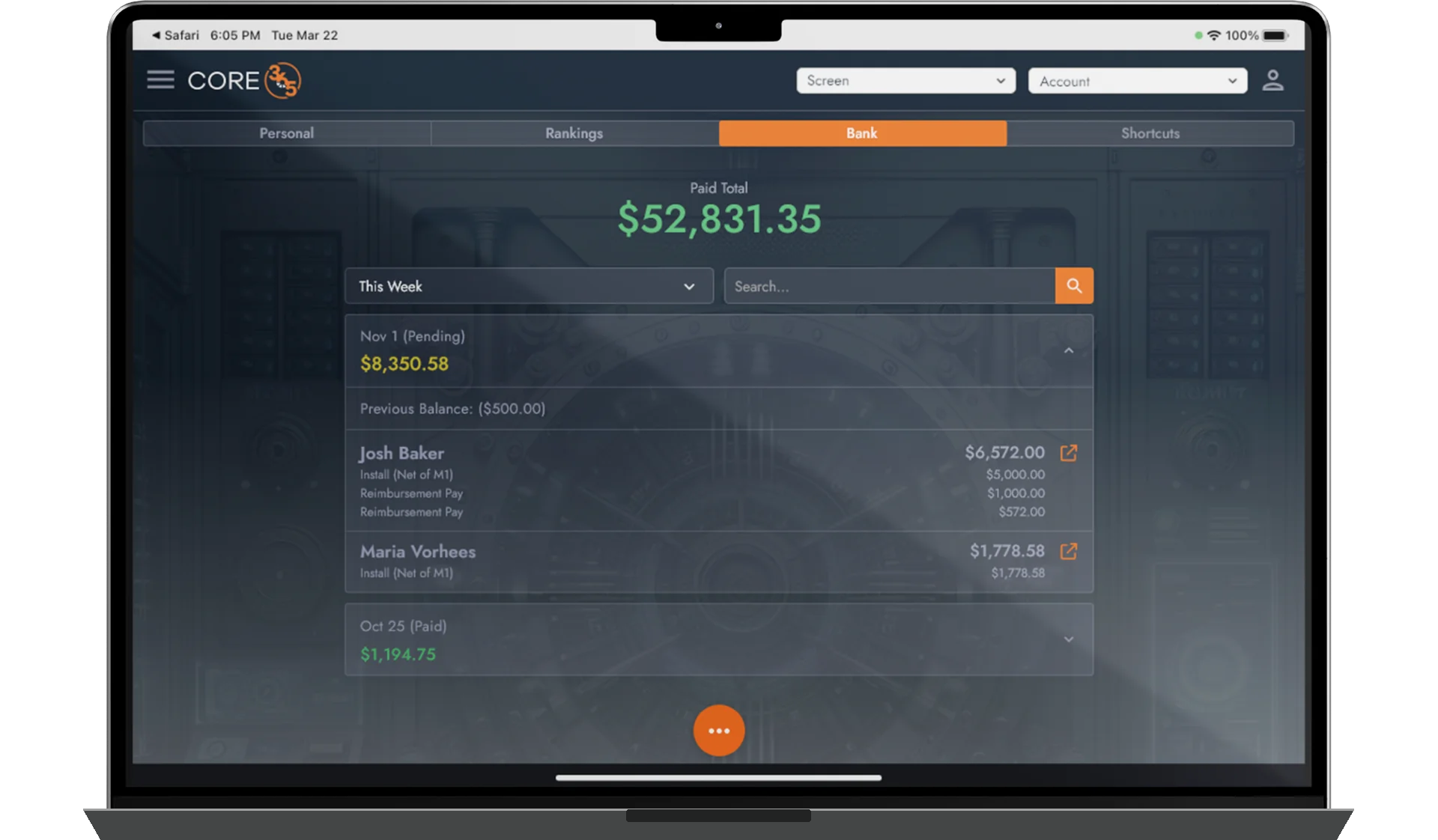
Configure flat, percentage-based, tiered, split, and multi-level commissions to fit different sales structures.
Calculate commissions using configured sales events, project milestones, funding conditions, and approval requirements.
Give authorized users access to commission balances, transaction details, adjustments, and payment history through the Bank.
Commission Plans Built Around How You Sell
No two sales organizations compensate their teams exactly the same way.
Commissions365 supports configurable compensation structures that can account for sales roles, production, performance, financing products, project economics, and organizational relationships. Organizations can manage different commission plans across representatives, setters, closers, managers, teams, offices, and organizational units.
Plans can combine the following methods and factors according to the applicable compensation policy:
- Flat-dollar, percentage-based, and production- or performance-based tiered commissions
- Split commissions, role-specific earnings, manager overrides, and multi-level or upline compensation
- Bonuses, incentives, deductions, reimbursements, and chargebacks
- Financing- and product-based factors, margin calculations, adders, and other configured compensation factors
Calculation methods vary by plan. The organization remains responsible for configuring and approving its compensation policies; Core365 does not determine legal entitlement to compensation.
Core365 calculates commissions and prepares payment information. It does not process payroll, directly disburse payments, withhold payroll taxes, transfer money, or hold commission funds.
Pay Eligibility Based on Actual Project Progress
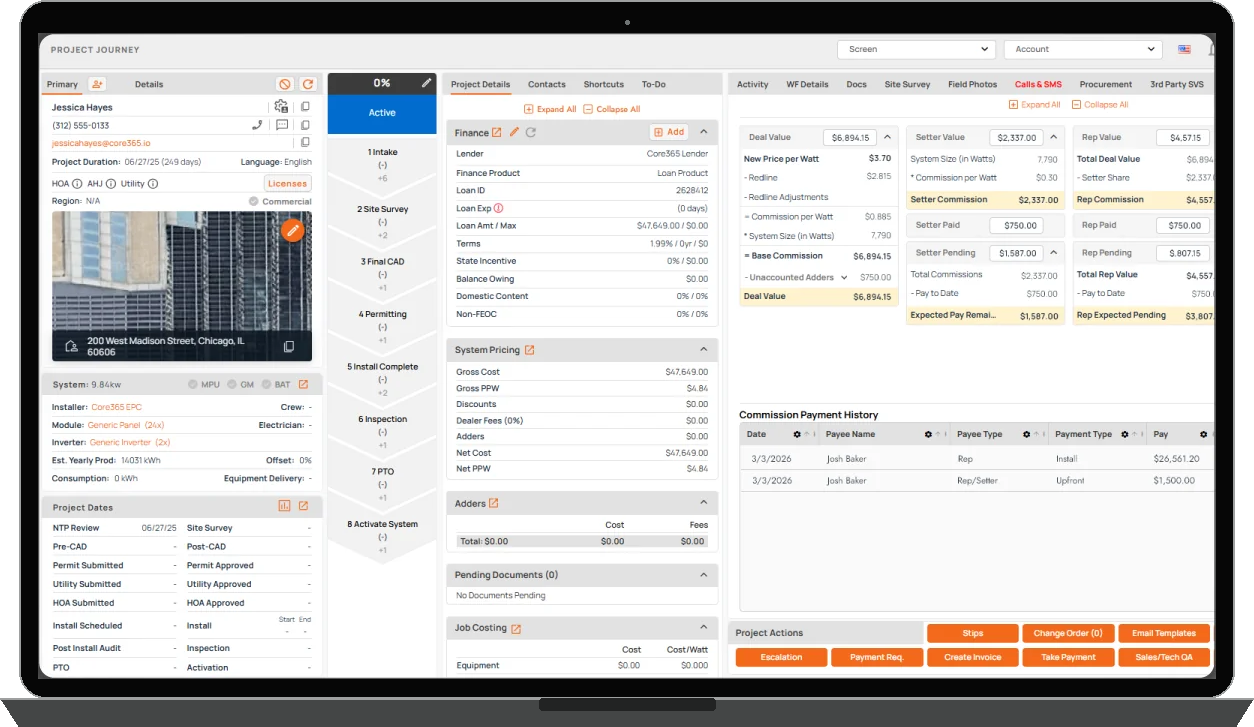
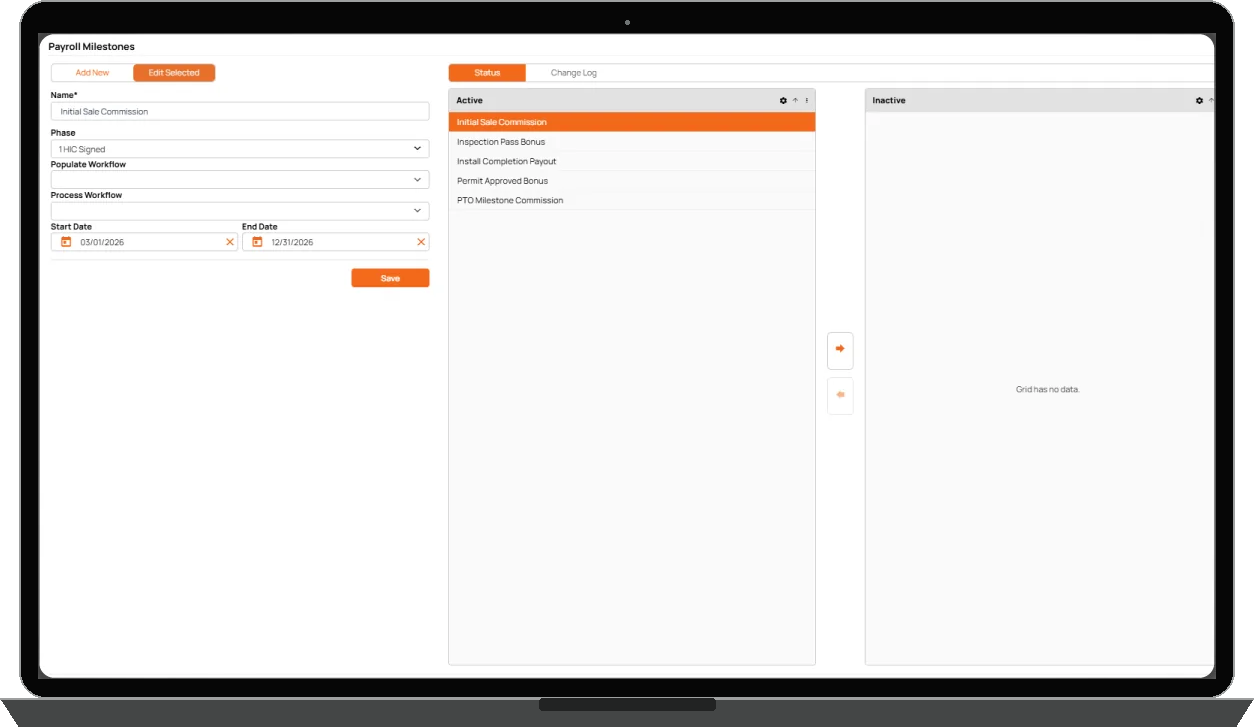
Commissions365 can determine commission eligibility using configured business events and project milestones. Depending on the plan, eligibility may be associated with contract execution, NTP, installation, inspection, PTO, lender funding, receipt of funds, or an authorized approval.
- Sale or contract execution and configured project milestones
- Installation, inspection, and Permission to Operate
- Lender funding, receipt of funds, and manual authorization
Eligibility does not mean a payment has been issued. A commission can become eligible or payable without Core365 transferring funds.
Support Complex Sales Teams and Compensation Hierarchies
Commissions365 supports compensation structures involving multiple participants in a sale. Organizations can configure commission splits, manager overrides, upline compensation, and role-specific earnings according to their business rules.
- Representative, appointment setter, closer, and manager compensation
- Split commissions and multiple eligible participants
- Manager overrides and multi-level or upline arrangements
- Different commission rules by team, office, or organization
Not every plan uses tiers or multi-level compensation. Earnings follow configured rules, not an automatically chosen compensation structure.
Manage Adjustments With Control and Accountability
Commission calculations sometimes require adjustments because of changes to project details, compensation agreements, customer outcomes, or previously recorded information. Authorized administrators can manage supported corrections, reversals, reimbursements, deductions, and chargebacks.
- Authorized commission and bonus adjustments
- Reversals, chargebacks, reimbursements, and deductions
- Approval requirements before adjustments become payable
- Historical records of correction activity
A reversal does not retrieve previously disbursed funds. Adjustments are not automatically approved and do not automatically change external payroll records.
Your Commissions, Clearly Accounted For
The Commissions365 Bank gives salespeople visibility into their commission activity. Users can review earned, pending, and paid commissions, examine transactions associated with customers or projects, and understand adjustments, reimbursements, or chargebacks.
- Earned and pending commissions, paid history, and upcoming commission amounts
- Customer- and project-linked transactions and detailed commission information
- Adjustments, reimbursements, and chargebacks
- Broader management visibility according to permissions
The Bank is an internal compensation ledger and visibility interface, not a financial institution or deposit account. It does not hold money, transfer funds, issue debit cards, or provide banking services.

The Right Compensation Information for the Right People
Salespeople can review their own commission ledger and calculation details. Managers can access authorized team-level information, while commission administrators can review compensation records within their assigned permissions.
- Individual history and commission calculation breakdowns
- Summary and detailed earnings information
- Authorized rankings and performance comparisons
Access depends on tenant configuration and assigned permissions. Managers do not automatically have unrestricted access to all organizations or offices.
Calculate Commissions. Prepare Payments. Keep Payroll Separate.
Commissions365 calculates compensation under configured plans and provides payment information for the organization's payroll or payment administration process. Authorized users can generate commission summaries and export payroll-ready or commission-payment files for submission to an external payroll or payment provider.
- Commission calculation and payment summaries
- Payroll-ready and commission-payment file exports
- Earnings and payment history visibility
The organization and its selected provider execute payments. Core365 does not run ACH, pay employees or contractors, withhold or file payroll taxes, calculate all employment tax obligations, issue W-2 or 1099 forms, or perform banking transactions. No direct payroll-provider integration is confirmed.
Connected to the Sales and Project Lifecycle
Commissions365 works with sales and project information maintained in Core365. Calculations can account for participating salespeople, project milestones, financing, products, adders, and other configured compensation factors, connecting commissions with the events that determine eligibility.
- Commissions365: sales compensation plans, incentives, eligibility, adjustments, earnings visibility, and payment preparation
- HR365: employee administration, time tracking, attendance, and hourly employee records and workflows
- External payroll provider: payment execution, applicable tax withholding, and disbursements. Neither Commissions365 nor HR365 processes payroll.
Recalculation behavior depends on the applicable plan and configured workflow. Not every data change causes an immediate recalculation.